Keeping up with dependency releases is recurring work for software teams. Updates help address security issues, keep projects supported and reduce the maintenance burden of falling behind. Each upgrade also takes time to review, apply, test and release, with changes that can affect the build, the running application or both.
Common dependencies include:
- Libraries and frameworks
- Container images
- Language runtimes

Keeping everything current sounds straightforward until the releases start arriving across multiple projects. Teams need a way to decide which updates deserve attention first. Three factors help:
- Criticality: Does the update fix a security issue, address a bug affecting your application or keep a dependency within its support window?
- Release cycle: How often does the dependency publish new versions? How will your team review those changes without letting the backlog grow?
- Effort: How many repositories or services need the update? What compatibility checks, code changes and testing will each require?
For example, @types/node supplies type definitions for Node.js APIs. It helps TypeScript check your code during development rather than providing the runtime implementation. An update can still require changes to type checks or build configuration. TypeScript’s type declaration guide explains that distinction.
A package such as @aws-sdk/client-dynamodb is used by application code to communicate with DynamoDB. Updating it calls for checking the database operations your application relies on. If several services use that client, the review and testing effort extends across those projects. See the AWS JavaScript guide for DynamoDB for its role in an application.
The reason for a release matters alongside its frequency. A security fix can need attention ahead of a routine feature update.
Why are we still doing this manually?
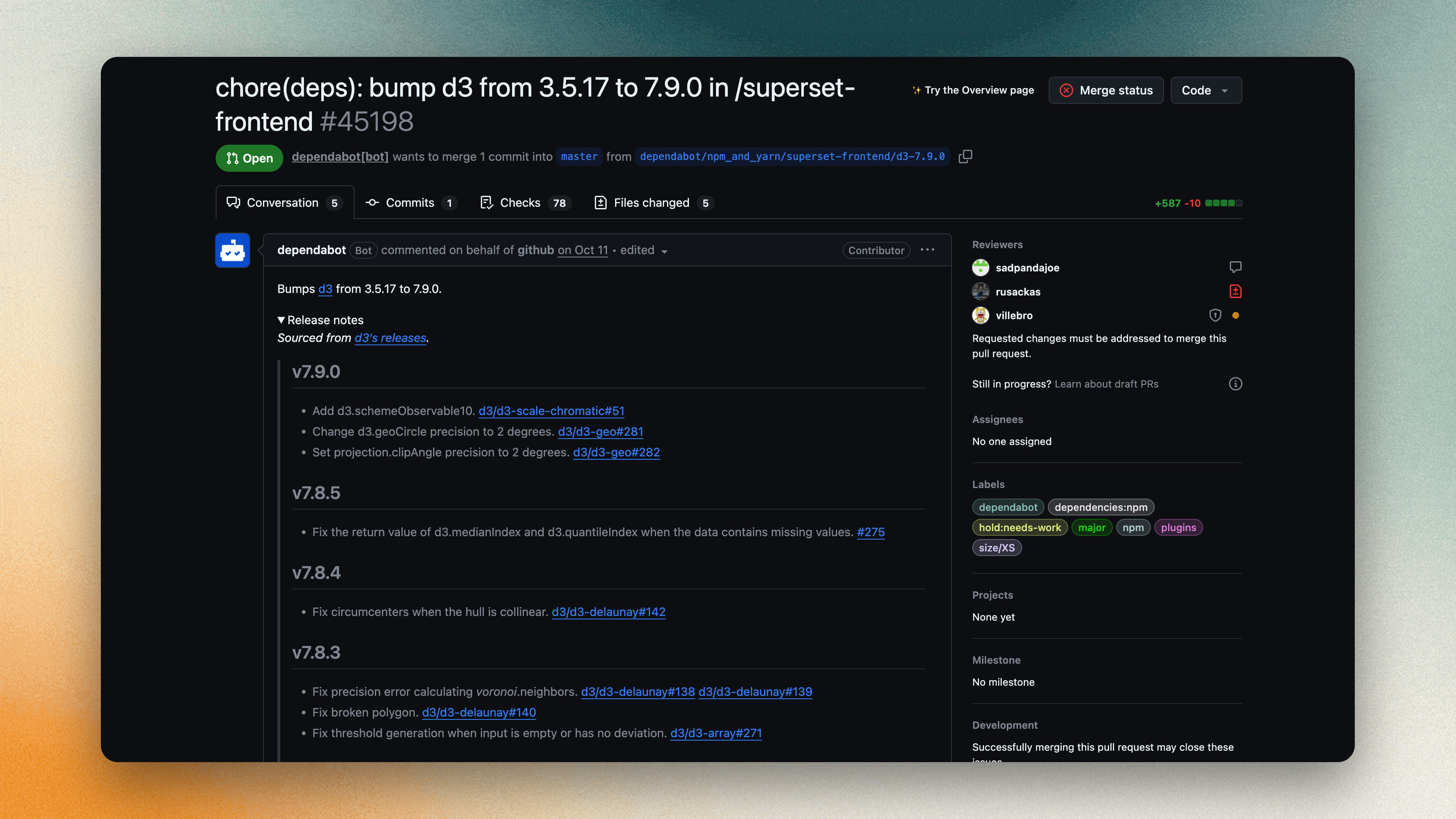
Currently most project admins use GitHub Dependabot for new dependency releases and opens pull requests to update your dependency files. It supports npm, pnpm, Yarn and Docker with configurable update schedules and groups.
But the issue is engineer still need to be there for decisions that depend on how your application works. When a build fails or an API changes, someone has to:
- Check the impact: Understand which application behavior the update could affect.
- Fix failures: Investigate the cause and make the required compatibility changes.
- Review the result: Check the diff and test evidence before approving the change.
That context is often spread across release notes, CI logs and the people who maintain the service. An engineer has to bring it together for each update.
Do you think that could be done without an engineer with a coding agent? By the end of this article, you’ll see what that takes and where human judgment still matters.
Why can dependency updates still get stuck with a coding agent?
A coding agent can investigate a Dependabot pull request that fails CI, fix affected code and rerun the tests. It still needs the target version, expected application behavior and required checks.

For example, a newer HTTP client version might change timeout behavior. If a test fails, should the agent adapt the application’s code or stop because the fix goes beyond the dependency update? The issue needs to make that boundary clear.
The dependency issue should specify which compatibility changes are allowed and when to stop. Each failed CI check needs to reach the next attempt with its output attached. Changes that require a broader application decision should return to a person.
If an engineer still has to copy CI logs into a chat, restart the agent and inspect every attempt, the dependency update remains a manual coordination task. A shared workflow connects the dependency issue, agent run and verification results, so failures reach the next attempt and reviewers can inspect the resulting change.
How does SuperPlane turn dependency updates into a repeatable workflow?
SuperPlane coordinates the dependency issue, coding agent, CI feedback and human review in one workflow. A task moves through Backlog, Implement, Verify and Done while its source, runs and pull request stay attached. Your team configures the checks and approval rules.
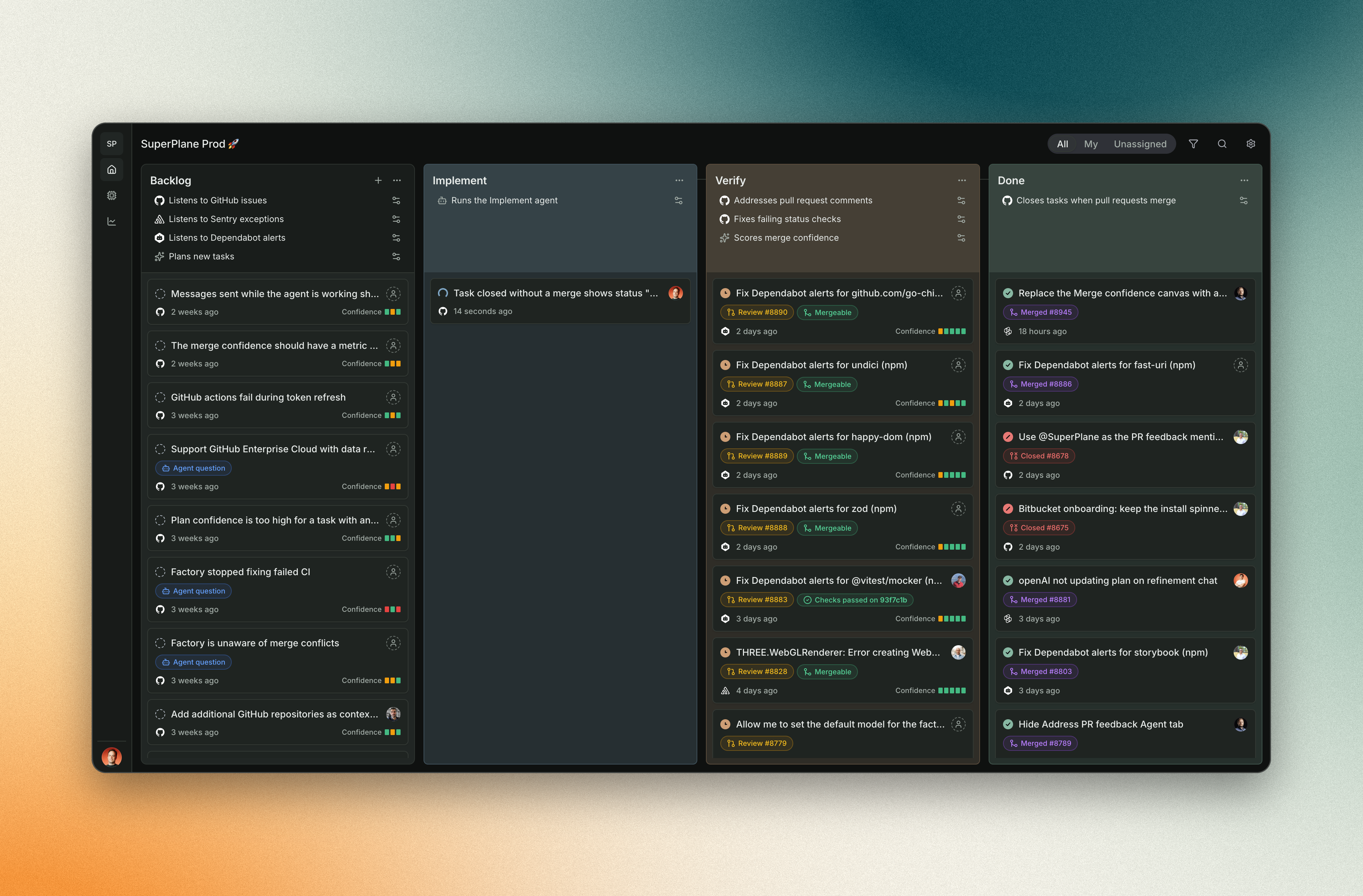
A real example: patching fast-uri
In our own repository, PR #8886 updated fast-uri from 3.1.8 to 3.1.9 in the Bitbucket Forge app. Created via SuperPlane, it changed only forge/bitbucket/package-lock.json: the existing dependency range already accepted the patched version.
A maintainer merged the PR after two GitHub checks passed. Its notes recorded successful installation and a version check, alongside an unrelated undici audit finding. That remaining finding stayed visible for review.

Example Factory workflow
To run a task like this from a GitHub issue:
Intake
Create a GitHub issue naming one package, the exact target version and acceptance checks. Use an intake to import it into Backlog. Confirm the repository and scope before selecting Start.
Implement
The configured agent reads the issue and repository instructions, updates the manifest and lockfile where needed and creates or updates a pull request. The Implement automation controls the steps around the run. In the fast-uri example, no manifest change was needed.
Verify
Run the build, tests and relevant security checks configured for the repository. Verify evaluates their results and pull request feedback. Route a failing check’s output back to the agent for another attempt, with a retry limit. Missing credentials or a broader scope decision should pause for attention.
Human review
Open the linked PR and review its diff, version resolution, required checks and remaining findings. Merge when the checks and your team’s review requirements are satisfied. Done follows the Factory’s configured completion rule.
If you run into any issues, our Build your first Factory guide walks you through setup and your first complete run.
Start small today but Automate more tomorrow
Start with one recurring task your team already understands maybe a dependency update. Use each run to improve the setup, checks and feedback before giving the Factory more work.
- Start with dependency updates : Choose one repository, one package and a clear target version.
- Expand once the workflow is reliable : Add failing tests, small bugs and routine fixes with clear acceptance checks.
- Measure the results : Track successful PRs, failures, engineering time saved and how often someone needs to intervene. Compare the results with your current process.
- Increase automation gradually : Keep your existing CI and review process, then automate more of the repeated steps as confidence grows.
Your first software factory doesn’t need to handle hundreds of engineering tasks. It just needs to reliably handle one. Start with the boring work, build confidence and expand from there.