
What’s new since v0.21.0
This release makes SuperPlane easier to start from GitHub, easier to edit with confidence and more useful as a shared operating surface for platform workflows.
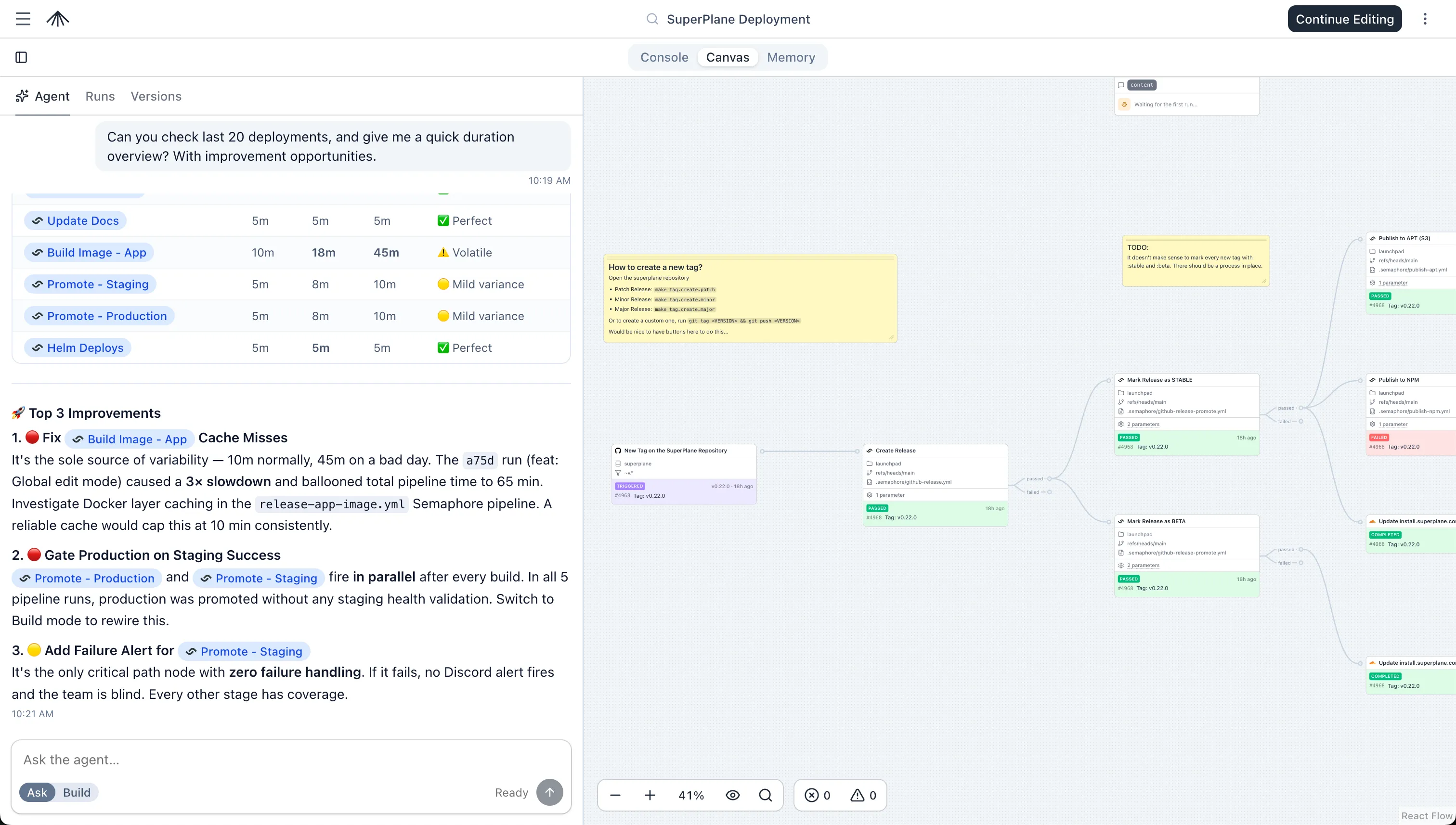
Canvases are now Apps
The biggest visible change is the rename from “canvases” to Apps across the product UI. The name reflects where we’re headed: a SuperPlane app is more than a workflow diagram. It’s the unit that brings together the canvas, the execution layer, memory, an agent, skills, custom runners and custom UI through panels. Much of this is still work in progress, but v0.22.0 is where that shape starts to show up in the product.
App creation is faster too: you can create an app instantly with a generated name, or launch one directly from a GitHub repository.
Better App editing
App editing now has a more complete review flow before you publish changes. v0.22.0 adds YAML diffs, visual diffs, diff summaries, an edit-mode diff toggle and version-aware run traceability so teams can understand exactly what changed between a draft and a published version.
The editing sidebar is also back with improved layout, draft handling, sidebar history loading and scroll preservation across version changes.
Agent modes and interactive sessions
Agents now support richer working modes for building, planning and asking questions. Sessions can use interactive widgets, mounted resources, follow-up messages while work is still running and improved build-mode rubrics.
The agent UI also received a performance pass, reducing unnecessary rerenders while typing and making stop/send behavior more reliable during active runs.
Runs, runners and operational visibility
Runner logs are now rendered as structured command sections, making long-running executions easier to read. Runners can be cancelled from the UI and administrators now have a panel for inspecting active runner tasks.
Workflow runs also record the originating version ID, which makes it easier to connect a run back to the app version that produced it.
Console and widgets
This release introduces the first version of Console, a dashboard-style surface for showing operational context through Markdown panels and widgets.
Widget tables and dashboard interactions received several usability improvements, including better table actions.
New components
- GitHub: Push triggers now support path filters and the
filePathMatches()helper, so apps can react only to changes in specific files or directories. - Jira: Issue management actions for creating, reading, updating and deleting issues, plus incident management for Jira Service Management (create, fetch and delete incidents).
- AWS: EC2 instance provisioning and teardown: launch instances and wait for running state, or terminate instances and wait for completion.
- Google Cloud: Delete Compute Engine VM instances from workflows, including when chained from upstream create or lifecycle triggers.
- Cloudflare: Integrations now use account API tokens instead of user API tokens for account-scoped access management.
- Core: HTTP requests support the
HEADmethod for health checks and header-only probes, plus a Display action for rendering workflow output in the UI.
Improvements
- CLI: Integration component example payloads are now included in the CLI index.
- Migration lock handling is more resilient for long-running migrations.
- Agent UI performance and styling improvements, including a simplified mode toggle.
- Memory moved into the top navigation bar for quicker access.
Bug fixes
- Fixed: Org settings layout no longer jumps when toggling change management.
- Fixed: Run detail URLs are clickable in the UI.
- Fixed: Agent chat no longer rerenders while typing.
- Fixed: Gray background flash when navigating to a run in the Runs view.
- Fixed: Agent stop action stays available while outcome building is active.
- Fixed: Agent UI width and re-render issues.
- Fixed: Workflow runs include the originating app version ID.
- Fixed: Previously loaded versions stay visible when selecting versions.
- Fixed: Rubric markdown sections are preserved correctly.
- Fixed: Running command label displays as “running”.
- Fixed: Edit mode sidebar state is isolated from other UI state.
- Fixed: Agent tab is hidden when the agent feature is disabled.
- Fixed: Agent follow-up messages work while a session is still running.
- Fixed: App sidebar history autoloads on open.
- Fixed: Version sidebar scroll position is preserved across version changes.
- Fixed: Stale draft diff state no longer appears after publishing.
How to upgrade
See Updating SuperPlane in the installation docs for upgrade steps for your setup.
Thanks to our contributors
Thanks to contributors who helped make SuperPlane 0.22.0 possible with code and docs additions and improvements:
Join the SuperPlane community
SuperPlane is open source (Apache 2.0). If you’re using it, here are the best ways to help:
- Star the repository on GitHub to show your support
- Join our Discord server to connect with the team and community
- Contribute by submitting bug reports, feature requests, or code on GitHub
- Share SuperPlane with your network and help us grow